Is Valiqa 21 CFR Part 11 Compliant?
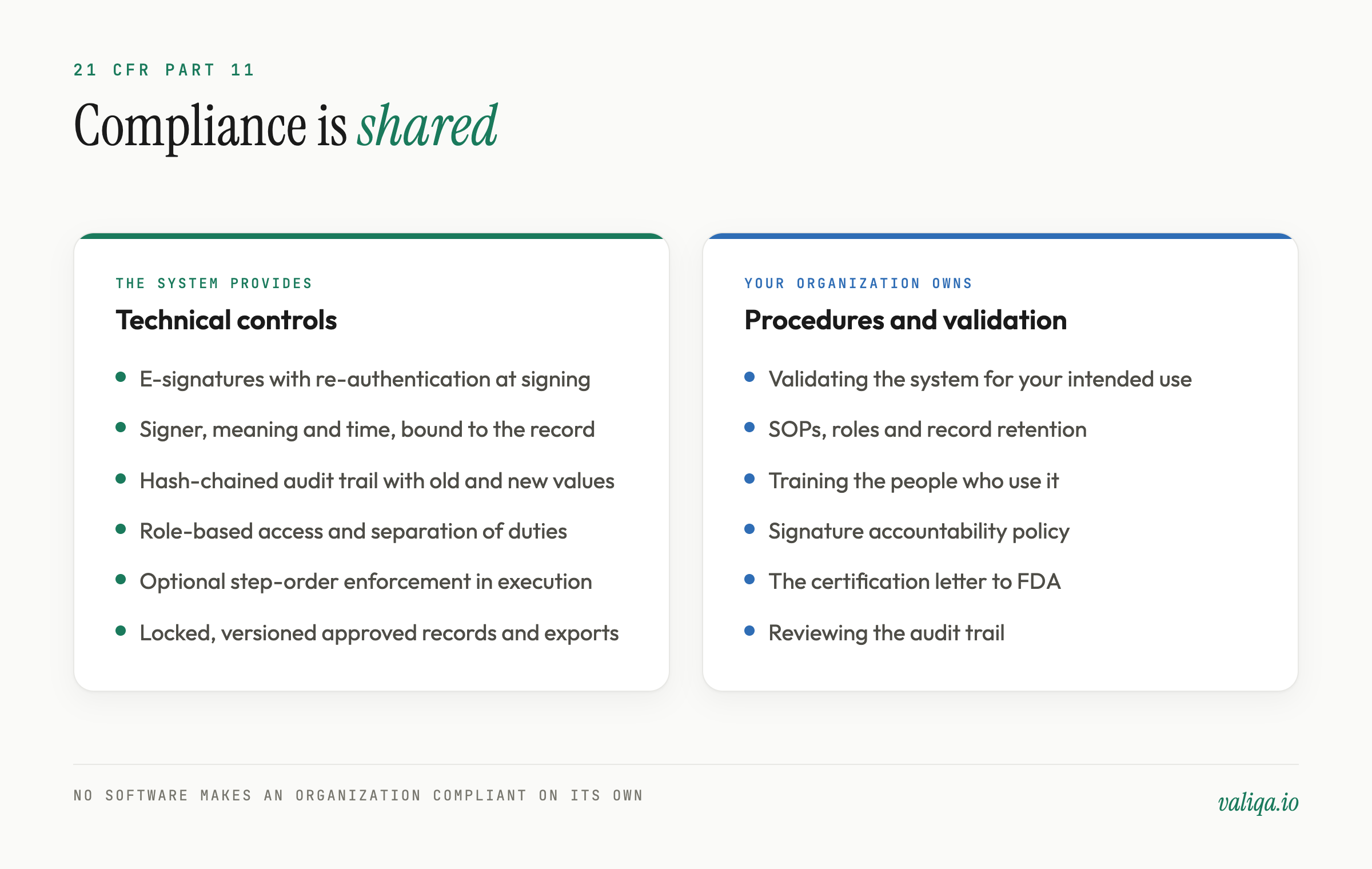
Valiqa provides the technical controls 21 CFR Part 11 expects of a closed system that holds electronic records and electronic signatures: Subpart C electronic signatures with re-authentication at the moment of signing, signatures that record the signer, meaning, and time and are bound to the exact record signed, a secure audit trail that records who changed what and when, role-based access control, optional step-order enforcement during execution, and locked, versioned approved protocols. What no software can do is make your organization compliant on its own. Part 11 compliance also depends on things only you control: validating the system for your intended use, written procedures, training, the certification letter to FDA for electronic signatures, and how you run the system day to day. FDA does not certify software as Part 11 compliant, so any vendor claiming a certificate is overstating it.
This article goes through Part 11 requirement by requirement, shows which control Valiqa provides and which part stays with you, and gives you a short list of checks you can run during a trial instead of taking anyone's word for it, ours included.
What Part 11 covers
21 CFR Part 11 applies to electronic records that an FDA predicate rule requires you to keep, and to electronic signatures used on those records. A predicate rule is the underlying regulation that requires the record in the first place: 21 CFR Parts 210 and 211 for drug GMP, and 21 CFR Part 820 for medical devices. Since February 2, 2026, the Quality Management System Regulation has incorporated ISO 13485:2016 into Part 820 by reference, and Part 11 applies to the electronic records that regulation requires in the same way it did before.
Validation protocols, executed results, deviations, and their approvals are predicate rule records for most manufacturers. If you keep them in a system instead of on paper, and sign them electronically, Part 11 applies.
The FDA's 2003 guidance, "Part 11, Electronic Records; Electronic Signatures - Scope and Application," is still the agency's operative interpretation. In it, FDA said it would read the scope of Part 11 narrowly and would exercise enforcement discretion on the Part 11 requirements for validation, audit trails, record retention, and record copying, and on all of Part 11 for qualifying legacy systems in operation before August 20, 1997, while continuing to enforce the predicate rules and the other Part 11 controls, including the electronic signature requirements. Enforcement discretion is not an exemption. It means FDA expects you to make documented, risk-based decisions about those controls, and in practice auditors still look hard at audit trails and validation for a system that holds GMP records.
The regulation has three parts that matter here:
- Subpart B, 11.10: controls for closed systems, from validation and access control to audit trails and operational checks.
- Subpart B, 11.50 and 11.70: what a signed record must show, and how the signature must stay linked to it.
- Subpart C, 11.100 to 11.300: the electronic signatures themselves, their components, and the controls on identification codes and passwords.
Part 11, requirement by requirement
The table below maps each requirement to what Valiqa provides and what stays with your organization. The right-hand column is not a disclaimer. It is where most Part 11 audit findings come from, whatever the software.
| Requirement | What Valiqa provides | What your organization owns |
|---|---|---|
| 11.10(a) Validation | Change-controlled AI model versions recorded on each generated document, and report totals computed deterministically | Validating Valiqa for your intended use, scaled to risk |
| 11.10(b) Accurate and complete copies | Audit trail export (who, what, when, which record), per-protocol and program inspection packages, and document exports (Team and above); old and new values are shown in the in-app audit trail | Producing copies for an inspector on request |
| 11.10(c) Record protection | Locked, versioned approved protocols; a write-protected audit table; encrypted, off-site database backups | Your record retention periods and procedures |
| 11.10(d) Limiting system access | Role-based permissions, per-company isolation, two-factor authentication, Google single sign-on | Deciding who gets access and removing it when people leave |
| 11.10(e) Audit trail | Append-only, hash-chained audit trail recording the user, time, action, and old and new values | Reviewing the audit trail as part of record review |
| 11.10(f) Operational checks | Step-order enforcement (set per protocol by an admin or QA manager), execution locking, and a fixed stage order (review, then approval, then release); a signature policy can require review signatures before approval | Defining the workflow your procedures require |
| 11.10(g) Authority checks | Role-based permissions on signing and release; with two or more members, the author of a protocol cannot also approve it | Assigning roles that match your SOPs |
| 11.10(h) Device checks | Valiqa does not restrict data entry to specific devices or terminals | Assessing whether device checks apply to your use |
| 11.10(i) Training | Nothing a vendor can supply | Training and qualifying the people who use the system |
| 11.10(j) Signature accountability policy | Nothing a vendor can supply | A written policy that holds people accountable for their electronic signatures |
| 11.10(k) System documentation | Not a system feature | Controlling your SOPs and the system documentation you rely on, including vendor documentation and release notes |
| 11.50 Signature manifestation | Each signature records the signer's name, the meaning, and the date and time, and they appear in exports and inspection packages | Confirming the manifestation meets your record format |
| 11.70 Signature and record linking | Each signature is bound to the exact record it signs | Nothing extra |
| 11.100 Uniqueness and certification | Named individual accounts; each signature is tied to the signer's own account | Verifying each person's identity, and the certification letter to FDA |
| 11.200 Signature components | Re-authentication at the moment of signing, with a password, authenticator app, or passkey | Confirming the signing method meets 11.200(a)(1) under your procedures, including the components used for the first signing in a session |
| 11.300 Identification codes and passwords | Unique accounts; repeated failed sign-in or signing attempts are limited, then locked, and the account owner is emailed | Your password aging, account review, and lost-credential procedures |
A few rows deserve more than a table cell.
Electronic signatures: what happens when someone signs
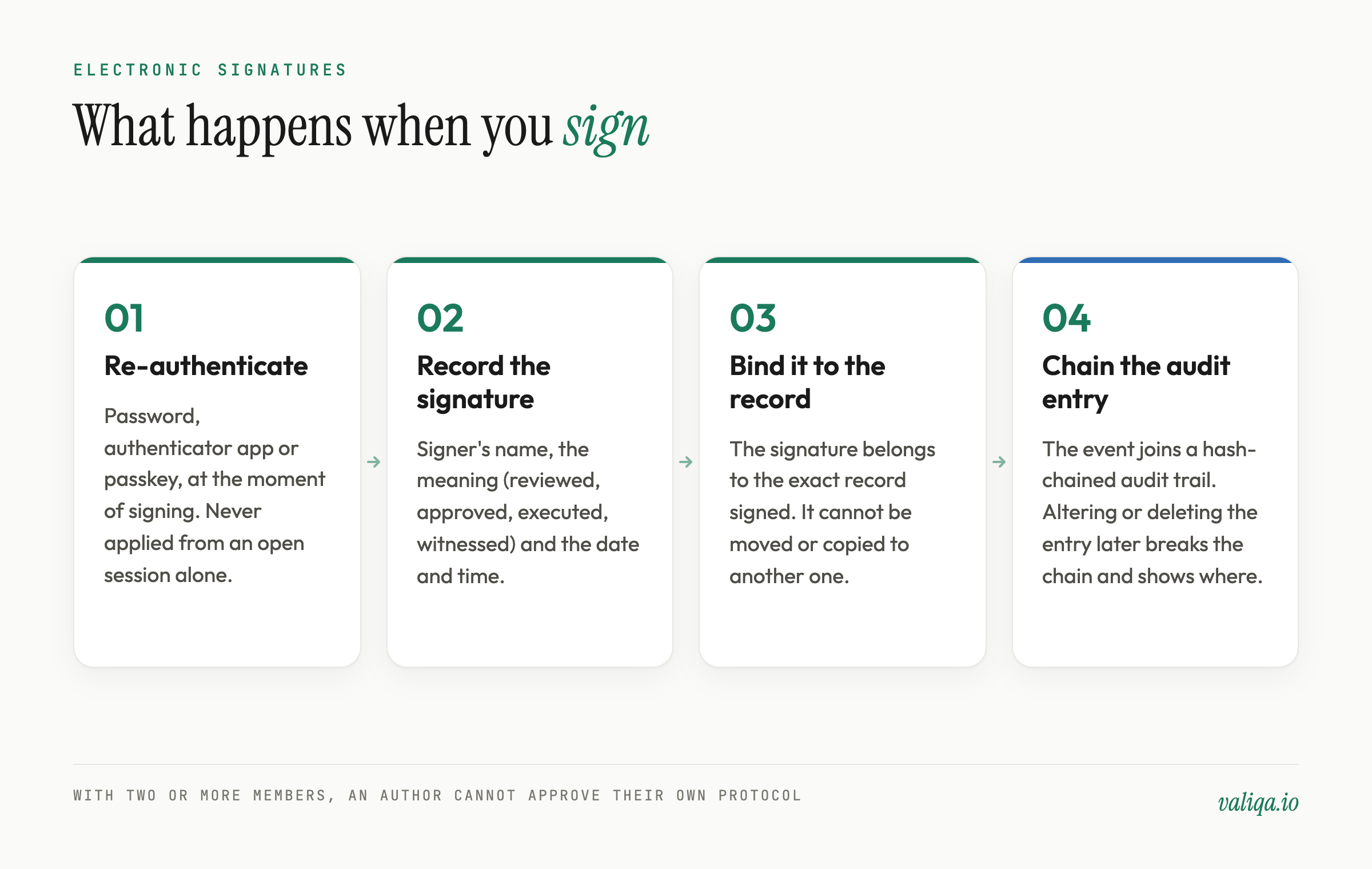
When a user signs a protocol, a deviation, or an execution step in Valiqa, the system asks them to re-authenticate at that moment, with a password, an authenticator app code, or a passkey. A signature is never applied silently from an open session. The signature records who signed, what the signature means (for example reviewed, approved, released, executed, or witnessed), and when, and it is bound to the exact record it signs, so it cannot be moved or copied onto a different record.
Separation of duties is enforced by the system, not by a reminder in an SOP. In a company with two or more members, the person who created or authored a protocol cannot also approve it. A one-person company can approve its own work, because there is no second person to do it, which is one reason Part 11 programs need at least two people. During digital execution, a step can carry a signature from the person who performed it and a separate signature from an independent witness, and the system will not accept the same person in both roles. Approval routing is configurable: the review, approval, and release stages can each require more than one independent signer.
Part 11 asks for one thing here that no software can do for you. Under 11.100(c), before or at the time your people first use electronic signatures, your organization must certify to FDA in writing that those signatures are intended to be the legally binding equivalent of handwritten signatures. That letter is yours to send, once, for your organization.
The audit trail: what tamper-evident means here
Section 11.10(e) asks for secure, computer-generated, time-stamped audit trails that independently record the date and time of entries and actions that create, modify, or delete records, without obscuring what was recorded before.
In Valiqa, changes to regulated records and specified security events are written to an append-only audit trail. Each entry records the user, the time, the action, the record, and the old and new values. The entries are cryptographically hash-chained: each one carries a hash that depends on the entry before it. If anyone alters or deletes an entry after the fact, the chain no longer verifies, and the verification points to the exact entry where it breaks. An administrator can run that verification on demand. The audit table itself is write-protected at the database level, so the application cannot rewrite history even if it tried.
What stays with you is review. A tamper-evident audit trail is only useful if someone looks at it. Most organizations fold audit trail review into record review before approval, and into periodic review of the system.
Controlled execution counts as an operational check
Section 11.10(f) asks for operational system checks that enforce the permitted sequencing of steps and events. For a validation system, the sequence that matters most is execution.
In Valiqa, digital execution runs step by step. An admin or QA manager can turn on step-order enforcement for a protocol, and results then cannot be recorded out of order. Each step records its result and evidence, a deviation can be raised in the step where it occurs, and the execution closes with a signed completion attestation. Execution locking means only one person records results on a protocol at a time, and when operators are assigned, only they can record results. If your site executes on paper, Valiqa produces a stamped, machine-readable controlled copy, and results transcribed back into the system need independent second-person verification.
Validation: your job, scaled to risk
Section 11.10(a) requires validation of systems to ensure accuracy, reliability, consistent intended performance, and the ability to discern invalid or altered records. That responsibility sits with the regulated company, for every system it uses, including Valiqa.
How much validation is enough depends on risk. For medical device manufacturers, FDA's Computer Software Assurance guidance, finalized in September 2025 and updated in February 2026, recommends that assurance effort follow the risk of the software's intended use, with unscripted and vendor-leveraged testing where the risk is lower. For pharmaceutical manufacturers, GAMP 5 gives the same risk-based framing. A system that drafts protocols humans then review and approve carries a different risk than one that controls a manufacturing process.
Three things in Valiqa make that validation easier to bound. Approved protocols are locked with a versioned snapshot, so what you validated against does not drift. Every change to the AI model configuration is recorded under change control, with the exact model version stored against each generated document. And the totals in a signed report are computed deterministically from your recorded results, not produced by a model, so they are reproducible.
If you are writing that validation yourself, the guide on how to write a Part 11 compliant CSV protocol walks through it, and CSA vs CSV: what FDA's final guidance changed explains how to scale it.
Where AI fits under Part 11
Part 11 does not mention AI and does not prohibit using it to draft records. What it requires is that records are trustworthy and that signatures mean what they say. A person who signs a protocol is accountable for its content, whoever or whatever drafted it, and FDA has already cited a manufacturer for putting AI-drafted specifications and procedures into use without quality unit review and approval. That case is covered in can you use AI to write GMP documents?
In Valiqa, AI drafts protocols, suggests requirement links, and reviews executed results for possible deviations. People review, approve, and sign. The AI never signs, never approves, and never closes a deviation. Each generated document records the model version that produced it, so an auditor can see exactly what drafted a record and who took responsibility for it.
How to check Part 11 controls yourself
A vendor's word is not evidence. During a Team trial with two users (audit trail export, chain verification and inspection packages are on Team and above), you can check the controls that matter in an afternoon:
- Try to approve your own protocol. With at least two users in the company, author a protocol, then try to approve it with the same account. The system should refuse.
- Sign something. Confirm the system asks you to re-authenticate at the moment of signing, and that the signed record shows your name, the meaning, and the date and time.
- Change an approved record. Try to edit an approved protocol. The system should require a controlled revision, and the original approved version should remain intact.
- Read the audit trail. Make a change, then find it in the audit trail with the old value, the new value, who made it, and when.
- Verify the chain. Ask an administrator to run audit trail verification and see the result.
- Run an execution out of order. Turn on step-order enforcement, then try to record a later step before an earlier one, and try to sign a step as both performer and witness.
- Export for an inspector. Produce an inspection package and an audit trail export, and check what each contains and that it is readable without the application.
Running the same seven checks on any system you are considering, not only Valiqa, is the quickest way to find out whether Part 11 support means a control or a sentence on a website. The comparison page covers how Valiqa differs from enterprise validation suites on the rest.
What Valiqa does not claim
Valiqa does not hold a Part 11 certificate, because no such certificate exists. FDA does not certify software, and Part 11 compliance is a property of how a regulated company uses a system, not of the system alone. Valiqa does not hold third-party security certifications. The controls described here are the ones live in the product today, summarized on the security page.
Valiqa is also not an organization-wide quality management system. It covers the validation lifecycle: generation, review and approval, execution, deviations, CAPA linked to those deviations, and the records that come out of them. Your document control, training records, and complaint handling live elsewhere, and so do the Part 11 decisions for those systems.
The short version
Valiqa supplies the technical controls Part 11 asks of a closed system: re-authenticated electronic signatures bound to the records they sign, separation of duties enforced once a company has two or more members, a hash-chained audit trail with old and new values, role-based access, optional step-order enforcement, locked approved versions, and exports for inspectors. Your organization supplies the rest: validation for your intended use, procedures, training, the FDA certification letter, and audit trail review. Check the controls yourself before you rely on them, with Valiqa or anyone else.
---
Valiqa is an AI-powered validation lifecycle platform for regulated manufacturing. Learn more at valiqa.io
Get new validation guides in your inbox
One or two practical guides a week, written for validation engineers. Unsubscribe anytime. Privacy policy
Frequently Asked Questions
Ready to automate your validation documentation?
Generate audit-ready IQ/OQ/PQ protocols in minutes, not weeks.
Get StartedWe use essential cookies for authentication and security. With your consent, we also use Microsoft Clarity, Google Analytics, and the LinkedIn Insight Tag on our marketing pages to understand how visitors navigate the site and to measure our advertising. Read our privacy policy.